Tiny Desk AI Video Generator
Tiny Desk AI puts faces into the closing fifteen seconds of Charlie Wilson's NPR Tiny Desk performance — the clip everyone has been reposting with football coaches in it. You send one photo to take the singer's spot, or five to fill the whole band.
No prompt, no editing app, nothing to install. Pay once, wait a couple of minutes, download a vertical MP4 with the song already on it. $4.99 for one video, $9.99 for three, $14.99 for five.
- $4.99 per video
- 15s · 720p · vertical
- Sound already in the file
Start here: add your photos
From $4.99 · one-time payment
By uploading you confirm the photo is yours, or that the owner is fine with it.
15 second MP4 · 720p · 9:16 · Sound included · 7-day refund
One video is $4.99, paid once, no subscription. If the render comes out wrong, email us within 7 days and we refund it.
The original repost, unedited. Yours runs fifteen seconds with your faces in it.
The trend
What is the Tiny Desk AI trend?
In October 2026 a clip started going round TikTok: the closing stretch of Charlie Wilson singing Outstanding at NPR's Tiny Desk, with five college football coaches standing in for the band. It passed two million views in a week, and then everyone with a group chat wanted their own five.
The joke works because nothing else in the footage changes. The room, the song, the camera move and the exact few seconds of the performance are already familiar to anyone who has seen the original — so the only thing left to swap is who is standing at the desk.
This site is one way to make one of those. It is not affiliated with NPR, it does not make music, and it does not need a prompt: you bring faces, the clip brings everything else.
More on the trend and the five seats- Original
- Charlie Wilson singing Outstanding at NPR's Tiny Desk, 2023
- The song
- Outstanding by The Gap Band, 1980
- What went viral
- The closing stretch, recast with five losing college football coaches
- First seen
- 18 October 2026, on TikTok
- Our part
- The faces. The performance and the audio are the clip's
So you want the outstanding tiny desk video without a model, a prompt or an editor
Every "how to make tiny desk ai video" tutorial walks you down the same road:
The DIY route
With one upload
Copy a prompt off TikTok and re-roll until a face holds
No prompt: the shot already exists
Pay a video model, then burn credits learning it
One photo, one price
Hunt for reference footage that matches your people
The footage is the product
Sync the sound by hand in an editor
The sound is in the file
An evening, if the model cooperates
A few minutes
You send the faces. We put them on the stage.
Watch the clip before you pay for it
Six finished runs from this tool. Three where one photo swaps the singer, three where five photos swap the whole band. Same fifteen seconds every time — the room, the instruments and the song are the original take. Sound is on, tap a card to play.
One photo — just the singer
Three runs · one photo each
The singer swapped
The guy in the red cap is gone. Everyone else in the frame is still the original band — same instruments, same cut points.
Another face, same fifteen seconds
Second photo, second run. Nothing else in the frame moved: the players behind him, the shelves and the song are untouched.
Third face through the same tool
Third photo, same recipe. It still ends on the saxophone close-up, exactly where the original does.
Five photos — the whole band
Three runs · one photo per player
Five photos, whole band swapped
The singer, the keyboard player, the two players behind him and the sax player — every face comes from one photo. The desk, the shelves and the song are the original take.
Second set, same fifteen seconds
A different five people, the same cut points. It still ends on the saxophone close-up, exactly where the original does.
Third set, same recipe
Five more faces through the same pipeline. Nobody in the frame is from the original band — the room, the instruments and the timing are.
All six came out of this tool. The room, the instruments and the song are the original footage.
How to make a tiny desk AI video in three steps
Three steps, about five minutes, no software to install. You do not write a prompt and you never open an editor.
Send your photos
Solo takes one photo, Five takes five. Face on, in daylight, nobody else in the frame. The order you upload them is the order people stand in, left to right.
Pick a mode and pay
Solo puts one face in the singer's spot, Five fills the whole band. $4.99 for one video, $9.99 for three, $14.99 for five. No subscription and no credits to top up.
Wait, then download
A couple of minutes for the render. What comes back is a fifteen second vertical MP4 at 720p with the song already on it, no watermark. If it comes out wrong, email us within 7 days and we refund it.
Five videos people actually send each other
Same fifteen seconds every time. The only difference is whose faces are in it.
- 01
Just you
One photo, the singer's spot, the other four seats filled with the band from the original shot.
- 02
The whole group chat
Five photos, five seats, in the order you sent them. This is the version that gets shared.
- 03
The office
Everyone from work on one stage. Nobody has to admit they were sent a photo of the boss.
- 04
The losing side
Five faces of the group that lost on Saturday, doing the chorus anyway.
Who stands where
The clip has five people in it. The order you upload decides which seat each face lands in, so send them in the order you want to see them.
Lead singer
Centre of frame, closest to the camera, mouth open on the first word of the chorus. This is the face people look at, so it is the one your group will recognise first.
Face on, eyes to the camera, neutral or half smiling. A photo where they are already laughing comes out laughing for the whole fifteen seconds.
Front keyboard
Left of the singer, turned three quarters away, hands on the keys. They are in focus for most of the clip because the camera starts here.
Head and shoulders, slight angle. Do not send a photo where the person is looking over a shoulder, it reads as a back.
Back left
Behind the keyboard, half hidden by the singer when the camera swings. They still show up in the wide shot and in the last beat.
Any clear photo of the face. Distance does not matter here because the model only keeps the face, not the room around it.
Back right
Opposite the back left, on the side the saxophone leans into. They get one close pass in the middle of the clip.
Same as above. If two people in your group look alike, keep the order straight, the model does not fix a swapped file.
Saxophone
Right of frame, the only person whose hands are visible the whole time. The horn is part of the shot, so their face sits behind it.
Face clear, hands out of the way. A photo holding something comes out holding it through the whole clip.
The numbers are the upload order. Getting the order wrong is the most common mistake, and it costs a whole video.
One photo in. Fifteen seconds out.
Three ways people use it, and what each one actually asks of you before you pay. No prompt writing, no timeline, no editing — the clip is already cut, the only question is who is standing in it.
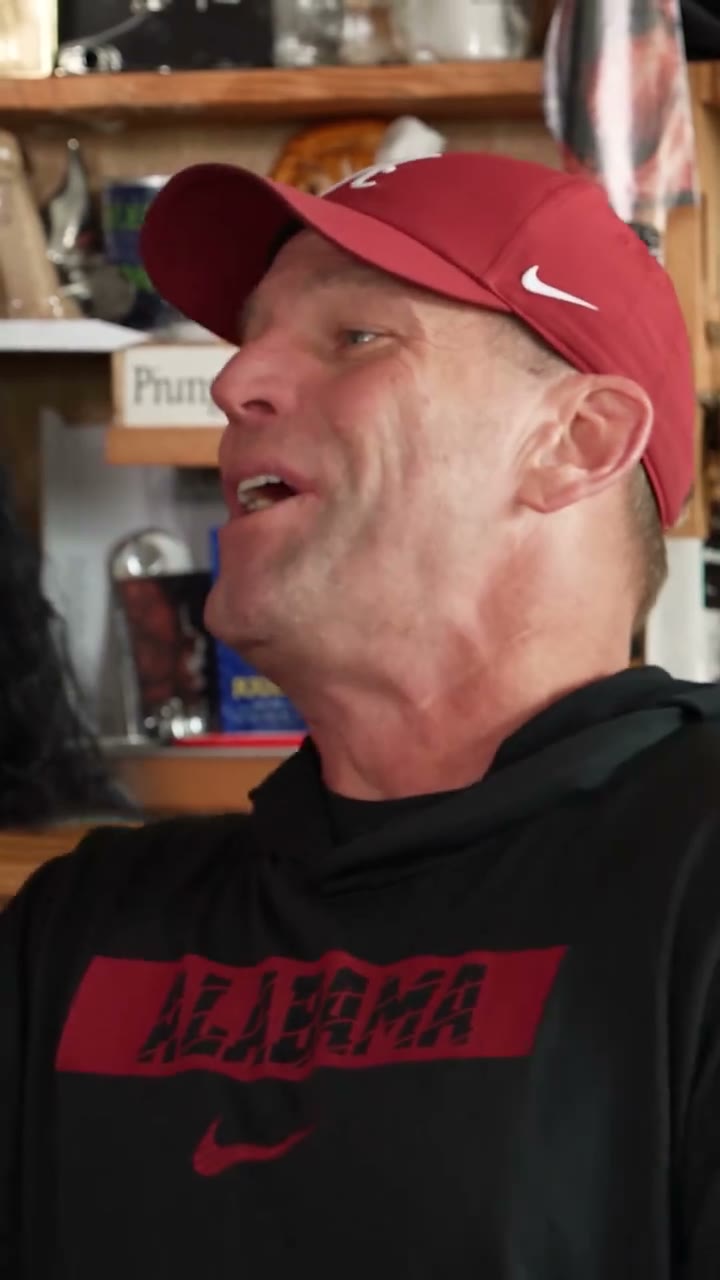
Reference clip · the singer's spot
01 — Solo
One face, front and centre
Most people send a photo of themselves and nothing else. In Solo that photo lands on the lead singer's spot at the front of the desk, and the other four players stay exactly where they were in the original shot, because they never came from you. They came from the clip.
What the photo needs is simple and unforgiving: a face you can see straight on, and enough light that the model can tell an eye from an eyebrow. A group photo cropped down to one head usually works. Somebody turned away, or half in shadow, does not — and we would rather say that here than take the money.
- Fill the frame with the face
- No sunglasses, no masks
- A phone photo is enough
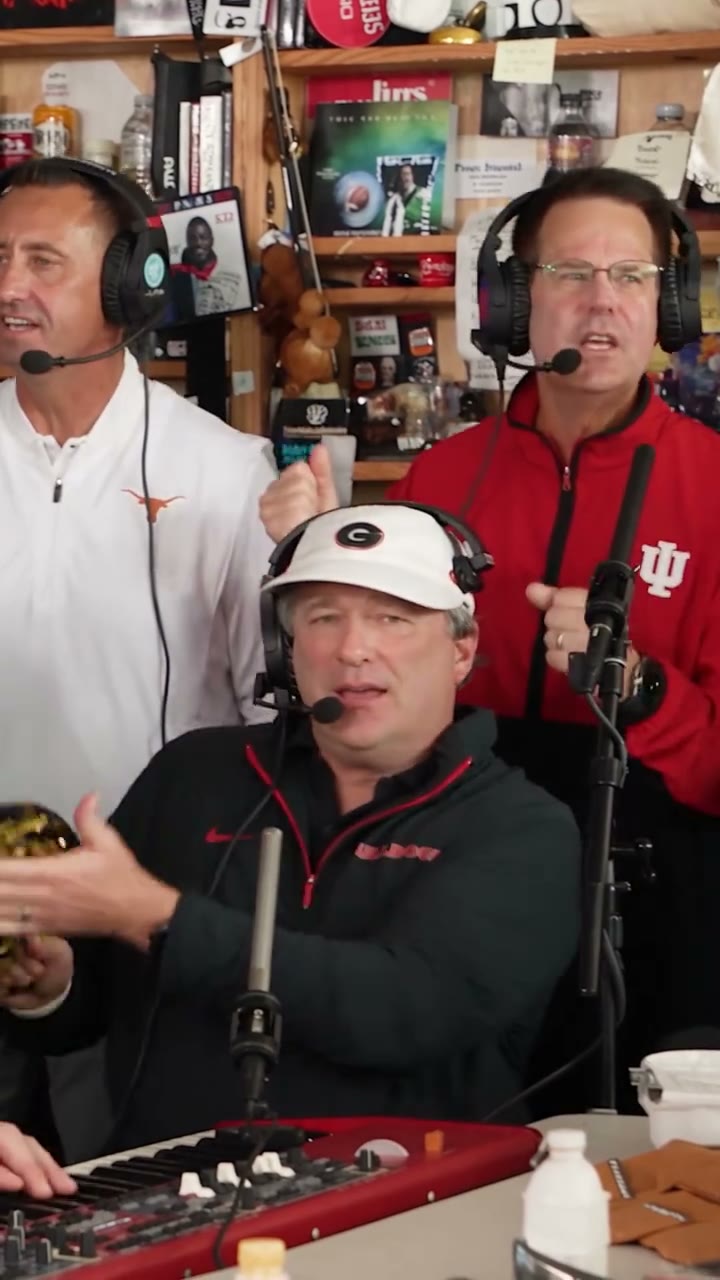
Reference clip · the five seats
02 — Five
Five faces, in the order you send them
Five is the version that matches the clip everyone has seen. You upload five portraits and they drop into five fixed seats: lead singer, front keyboard, back left, back right, saxophone. The order you pick them in is the order they stand in — no rearranging afterwards.
Send five even if you only care about two of them. An empty seat reads worse than a stranger's face. Keep the crops similar, too: one selfie shot from above next to one straight-on passport photo makes the row look like it was assembled by a machine, which it was, but it should not look that way.
- Five separate photos
- Same sort of crop in each
- Order is left to right
Stills are from the original repost, not videos made with this tool.
Tiny Desk AI pricing: pay once, no subscription
One model, one format, three packs. Pick by how many videos you want.
Paid once. A failed render never counts against your pack, and every order is refundable for 7 days.
Your video stays online for 7 days. Download it right away, and open your account once in that window so the clip is kept.
Why no free trial? Every render is paid GPU time. We would rather sell your first video cheap than give away renders that mostly go unused.
Tiny Desk Video Generator FAQ
The practical stuff, answered before you ask.
A tool that puts your faces into the closing fifteen seconds of Charlie Wilson's NPR Tiny Desk performance of Outstanding. You upload one photo for the singer's spot or five for the whole band, pay once, and download a vertical video with the original song on it. Nothing to film, no prompt to write.
One fifteen second video. Vertical, 720p, sound already in the file, no watermark. You send photos, pick a mode, and the render puts your people into the desk concert shot.
No. Tiny Desk AI is an independent tool. It is not connected to NPR, NPR Music, the Tiny Desk Concerts series, or anyone who played on it, and nothing here is endorsed by them. We use the name to describe the format, nothing more.
One for Solo, five for Five. In Five mode the order matters: the first photo goes to the singer's spot, the rest fill the seats left to right. A swapped order comes back with the wrong person in front.
Face on, daylight, eyes to the camera, nobody else in frame, at least 800 pixels on the long edge. Screenshots of other photos and heavy filters both cost you detail the model needs.
Yes. The file arrives with the audio already in it, so you can post it without adding anything. If you would rather use a licensed sound inside the app, the video still works, just mute it first.
The face, the hair and the general build carry over. Glasses, jewellery and small details often drift, and the model never gets a likeness exactly right. If a face comes back clearly wrong, that is a failed render and we refund it.
A few minutes at normal load, longer when the queue is busy. The order page shows where your render is, and you can close the tab, it keeps working without you.
Only with their permission. You are uploading a face and asking us to put it in a video, so the same rule as posting that photo yourself applies. For paid ads or brand work, write to us before you order.
No. One payment, no auto-renew, nothing to cancel.
Reply to the receipt within seven days and we refund the order. Telling us what went wrong, a face that drifted or a seat that came out empty, is also how the next render gets better.
Photos are deleted within 24 hours of the render finishing. The video stays online for seven days, so download it the same day. After that the file is cleared from our servers.